The Home Cookin Cloud
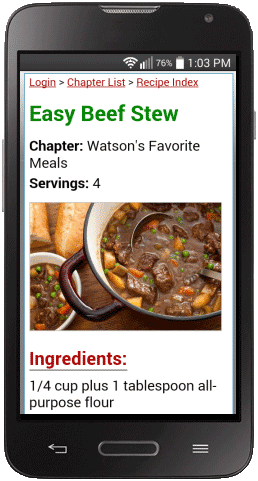
The cloud provides temporary storage you can access with the web
browser on your tablet or smart phone. You can view your recipes online
whether you are in the kitchen or out of town on vacation.
The cloud is also a convenient way to transfer your entire recipe
collection from one computer to another. Simply upload to the cloud on
one computer, then download from the cloud on the other.
Important: Cloud uploads are removed periodically to make
room for new uploads. You may upload again at any time to ensure your
latest recipes are available online. The Home Cookin cloud is not
designed for long term storage and should not be relied on as a
backup.
Cloud Viewer Login:
After you have uploaded your recipes, use
the web browser on your smart phone or tablet to visit:
www.mountainsoftware.com/recipes/login.php
Log in with the user name and password you created in Home Cookin when
you uploaded. Recipes are organized by chapter and index the same way
they are in Home Cookin.
Download recipes from your cloud account
Upload your recipes to
the cloud then you can download them to another computer. Your grocery data and meal plans will also be downloaded from the cloud.
- If needed, install Home Cookin on your new computer.
- Make sure your computer is connected to the internet.
- Open Home Cookin and click the Options tab.
- Click the Download button.
- Click OK to confirm it is OK to overwrite the existing
recipes.
- Enter the User Name and Password you used to upload
your recipes to the cloud.
- Click OK and your recipes will be downloaded from the
cloud to Home Cookin.
NOTE: The Home Cookin cloud is NOT a substitute for regular
file backups.